
Reports - FAQs
Frequently asked questions about running, filtering and exporting reports. For an overview of what each report is for, see Reporting.
How do I see a general ledger for just one bank account?
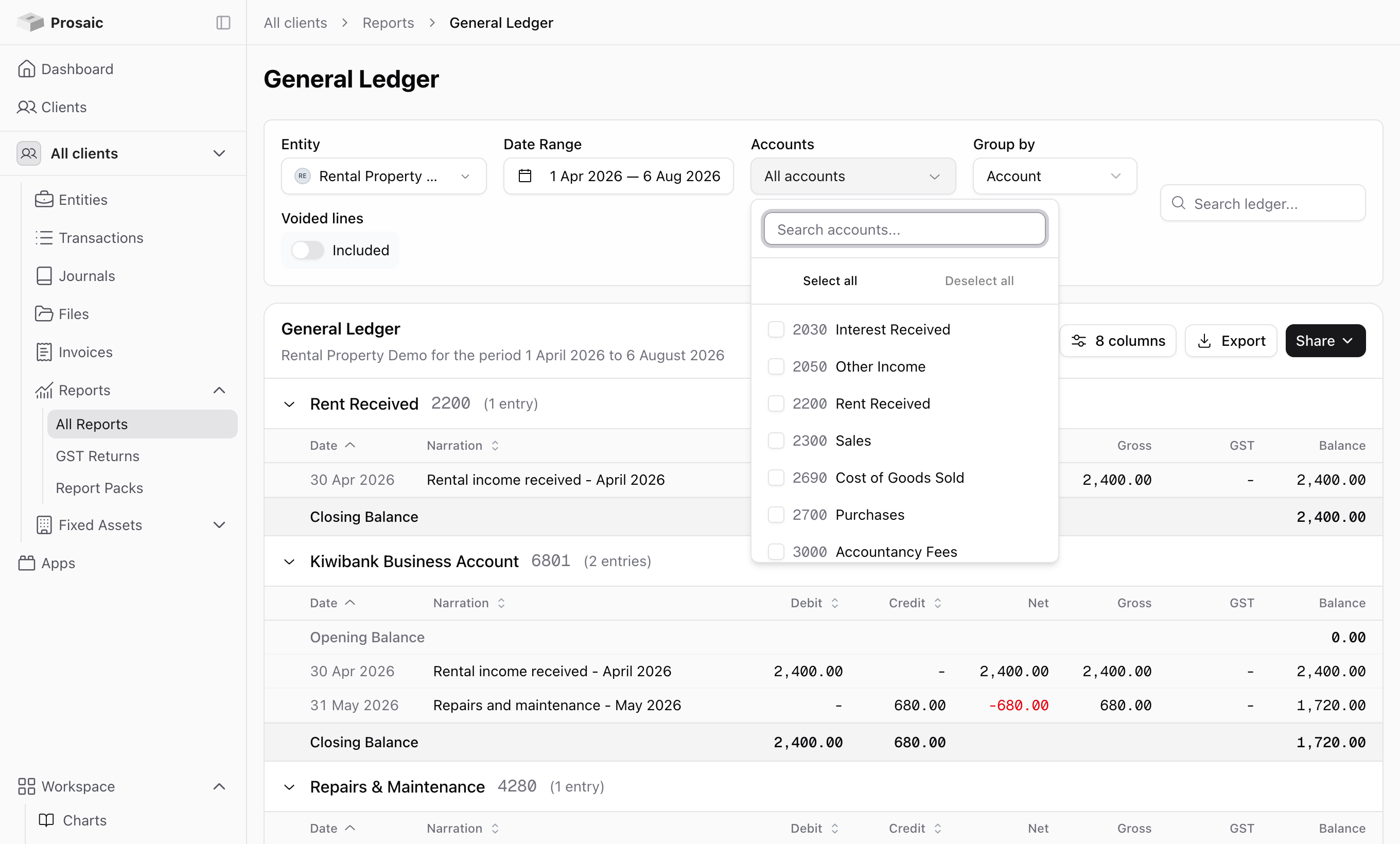
Go to Reports → General Ledger, then use the Accounts filter to select the bank account you want. Clear the other accounts and the ledger shows that account only.
The same filter works for any account, so it's also how you'd pull a ledger for a single expense code before a query goes back to the client.
How do I show comparatives?
Comparatives are called Comparison in Prosaic. On the Balance Sheet and Profit & Loss, set Comparison to the basis you want and then choose how many Periods to show.
- On the balance sheet, compare by Months or Years.
- On the profit and loss, compare by Month, Quarter, Year or a Custom date range.
Set it to No Comparison for a single-period report.
The Xero journal export doesn't accept comparison periods. Set Comparison to No Comparison before exporting a trial balance to an external ledger.
How do I find a particular cost, like home office?
Two ways, depending on what you're after.
- If you know the account, filter the General Ledger to it. That gives you every transaction coded there for the period.
- If you're looking for a description rather than an account, use the Search ledger box on the General Ledger to search the transaction detail.
Can I group the general ledger by transaction instead of by account?
Yes. Use Group by on the General Ledger and switch between Account and Transaction.
Can I see voided entries?
Yes. The General Ledger has a Voided lines toggle. It's off by default, so a voided journal won't distort the report, but you can turn it on when you're investigating what happened to an entry.
Can I group accounts under a custom report code?
Not at this time. Reports group accounts using the entity's chart of accounts, and there's no separate reporting-code layer you can define and group by.
It's planned. In the meantime there are two things worth knowing: the mapped codes on a chart template will translate your accounts into another system's codes when you export, and if the grouping you want is by cost centre, branch or project rather than by account, Dimensions may already do what you need. On the profit and loss, Segment by breaks the report out by dimension.
What formats can I export in?
Reports export as PDF, Excel or CSV. PDFs are formatted like standard accounting reports, so they're suitable for sending to a client or dropping into workpapers.
The trial balance has an extra option, External Ledger, for producing a file another accounting system can import. See Exporting client data to another ledger.
Can I email a report to a client?
Yes. Each report has a Share option that emails it with a message. Scheduled sharing, so a client automatically receives a monthly profit and loss, is on the roadmap rather than available now.
How do I send a client a list of transactions they need to explain?
There's a dedicated flow for this. See How do I send clients a list of unreconciled transactions to review?
Why doesn't my report include a transaction I can see in the bank account?
The two usual causes are the entity's conversion date and reconciliation status. Transactions dated before the conversion date are excluded, and unreconciled transactions haven't been posted to an account yet, so they don't appear in the profit and loss or balance sheet. See Bank Accounts – Opening Balance, Conversion Dates and Statement Balance.
Need help?
If a report isn't showing what you expect, use the 💬 button in the app or email help@prosaic.works.