
Reporting
Prosaic’s reporting is designed to help you move quickly between high-level summaries and detailed transaction data, while making it easy to share clear, professional reports with your clients.
Reporting in Prosaic focuses on clarity, speed, and good accounting hygiene — especially for GST.
Core Financial Reports
Prosaic provides a straightforward set of core financial reports, including:
- Profit and Loss
- Balance Sheet
- Trial Balance
- General Ledger
The General Ledger has been rebuilt to provide a high level of detail. You can view transactions individually or group them by account, with full visibility of transaction dates, descriptions, and narrations.
These reports work together, allowing you to understand both overall performance and the underlying activity that supports it.
Drill-Down and Ledger Detail
From summary reports such as the Profit and Loss, you can drill down directly into the General Ledger for any account.
This makes it easy to:
- Investigate unusual movements
- Understand what’s driving a particular balance
- Move quickly between clients without losing context
The drill-down workflow is designed to be fast and intuitive, supporting efficient review across multiple entities.
GST Reporting and Ongoing Audit Visibility
GST reporting is a key focus in Prosaic.
GST returns track:
- Reconciled and unreconciled transactions
- Client review of uncoded statement lines
- Late claims, recorded clearly when returns are finalised
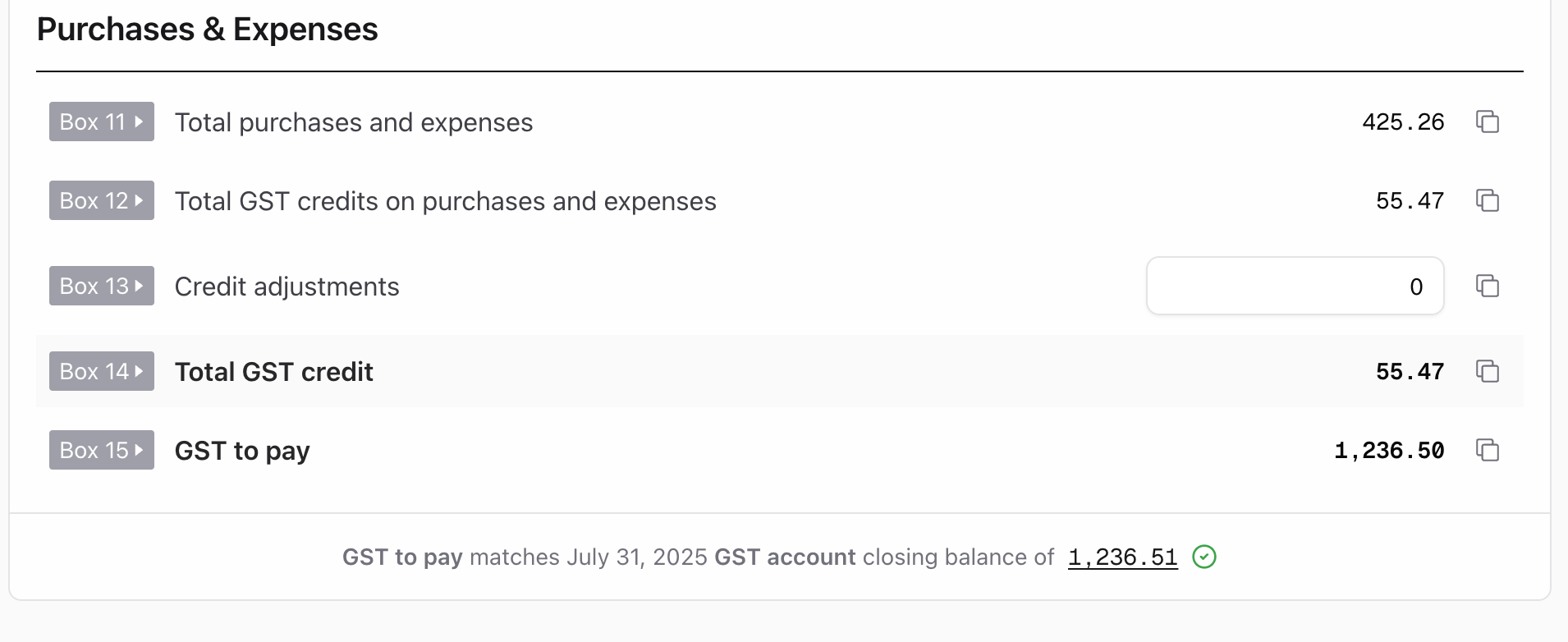
To support better GST control throughout the year, Prosaic also includes an audit snapshot at the bottom of each GST return. This shows:
- The GST to pay (or refund) for the period
- The closing balance of the GST account for the same period
When these figures match, it’s a strong signal that the GST account is in balance. When they don’t, it gives you and your team an early opportunity to investigate — for example, unpaid GST, timing differences, or journal-based adjustments — rather than discovering issues at year end.
Exporting and Downloading Reports
All reports can be downloaded in formats that work for you and your clients:
- Excel
- CSV
PDF reports are formatted to look like standard accounting reports, making them easy to share externally or include in workpapers.
Sharing Reports with Clients
Prosaic makes it easy to share reports directly with clients.
You can email reports with commentary, including comparisons between periods, to help clients understand performance and see the value of the work being done.
Scheduled report sharing is coming soon. This will allow you to automatically send reports — such as a monthly Profit and Loss or cash summary — on a set cadence (for example, mid-month), helping clients stay informed throughout the year.

What’s Coming Next
Reporting in Prosaic will continue to expand, with more tools planned to support year-end workflows and deeper analysis.
As always, the focus is on keeping reporting practical, transparent, and efficient — without unnecessary complexity.