
What's New - October 2026
Wow, what a month! October has been a busy one for the team, jam packed with new product updates.
The headline story this month - we've made some major and highly requested improvements to invoicing.
Its also quick and easy to register and record sale of fixed assets, we added a tool to import historical ledger transactions, introduced improvements across reporting and bank reconciliation, and we're opening up Prosaic AI in Open Beta.
Phew... 😅
Here's what's new this month. Buckle in.
🧾 Invoicing: a big step forward
We've made some significant upgrades to invoicing, introducing a more complete accounts receivable workflow to help you and your clients manage invoices, payments and outstanding customer balances.
These changes also lay the groundwork for future support for invoice-basis GST, bills and other accrual-based reporting.
The new invoicing features are available in Beta, on request. They change how invoices and payments are recorded in the general ledger, so we recommend reading our Accounts Receivable Beta guide before enabling them.
You can also explore our full invoicing guides.
To request beta access to new invoicing in Prosaic, get in touch with our team at hello@prosaic.works
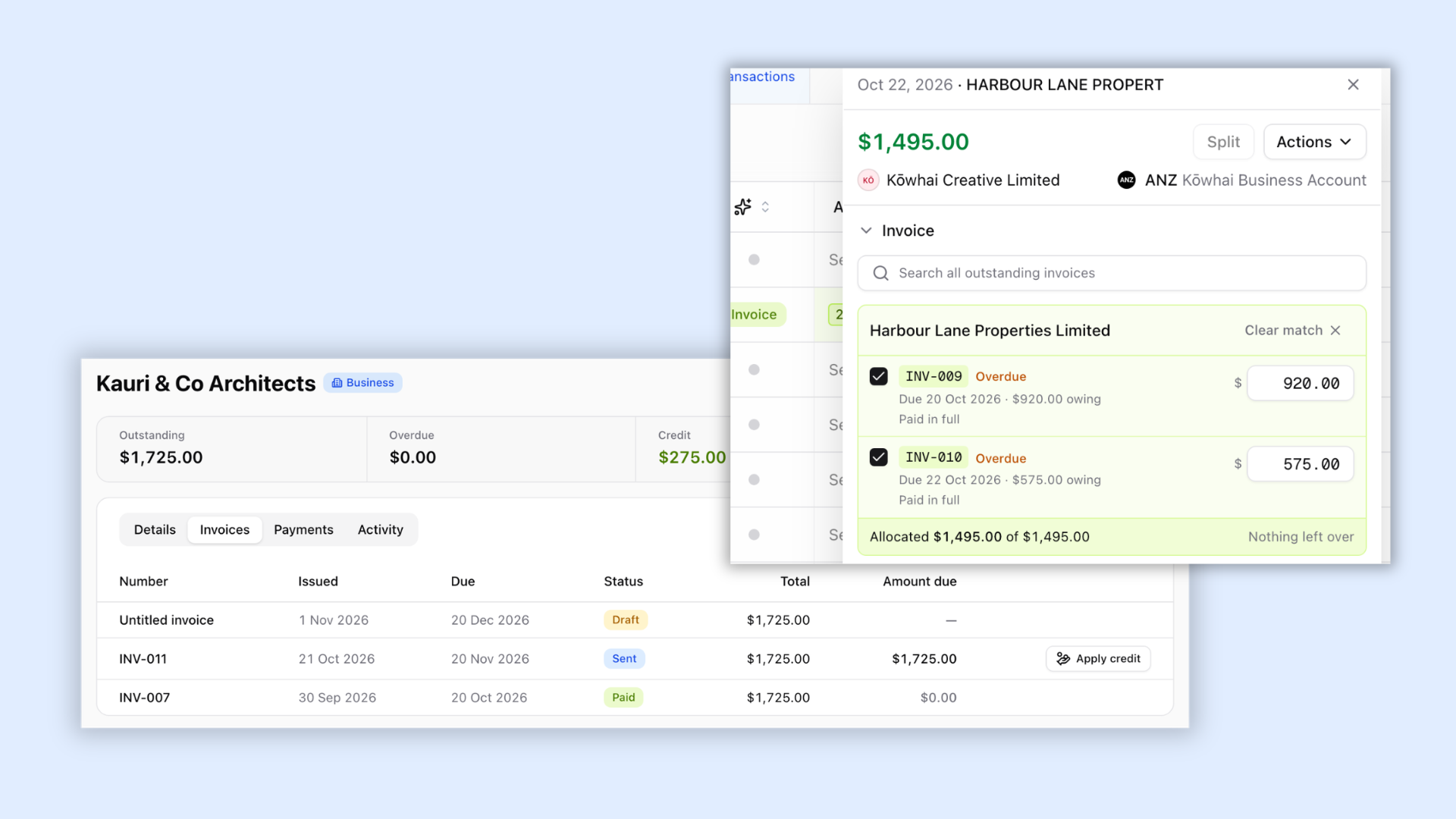
Payments, overpayments and customer credit
We've expanded the way Prosaic handles invoice payments and customer balances.
With accounts receivable enabled, finalising an invoice now posts it to the general ledger, and payments reduce the amount owing rather than recording the income again.
You can now:
- Record manual payments received outside bank feeds, such as cash.
- Manage part payments and track remaining balances.
- Settle multiple invoices from a single bank receipt.
- Handle overpayments as customer credit, which can be applied to future invoices or refunded.
- Track outstanding balances with clearer invoice statuses and amounts due.
Invoice PDFs also show amounts paid and remaining balances.
Customer activity and aged receivables
Each contact now has an Activity tab, bringing together invoices, payments, credits, refunds and outstanding balances in one place.
We've also introduced an Aged Receivables report, showing outstanding invoices by customer and age, with the ability to reconcile balances against the general ledger.
Custom invoice templates
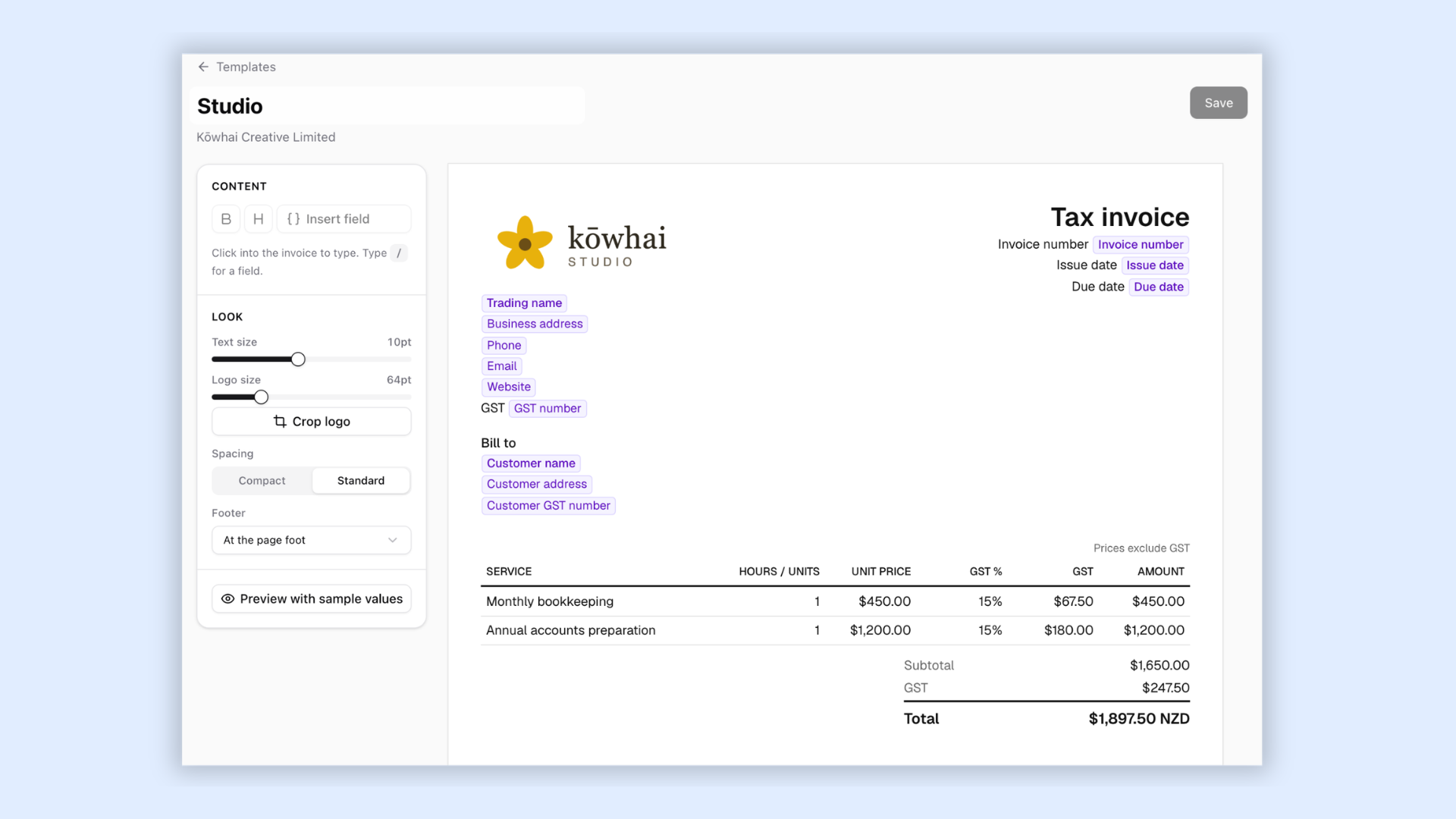
You can now create your own invoice templates for each entity, giving you more control over how invoices look and what information they include.
With the new template editor, you can:
- Customise wording, fonts, spacing and logo sizes.
- Insert dynamic fields such as business name, GST number, bank account and due date.
- Show, hide, rename and reorder invoice columns.
- Set a default template for each entity or a specific customer.
Prosaic also checks templates against IRD's taxable supply information requirements and warns you if required information is missing.
Recurring invoices
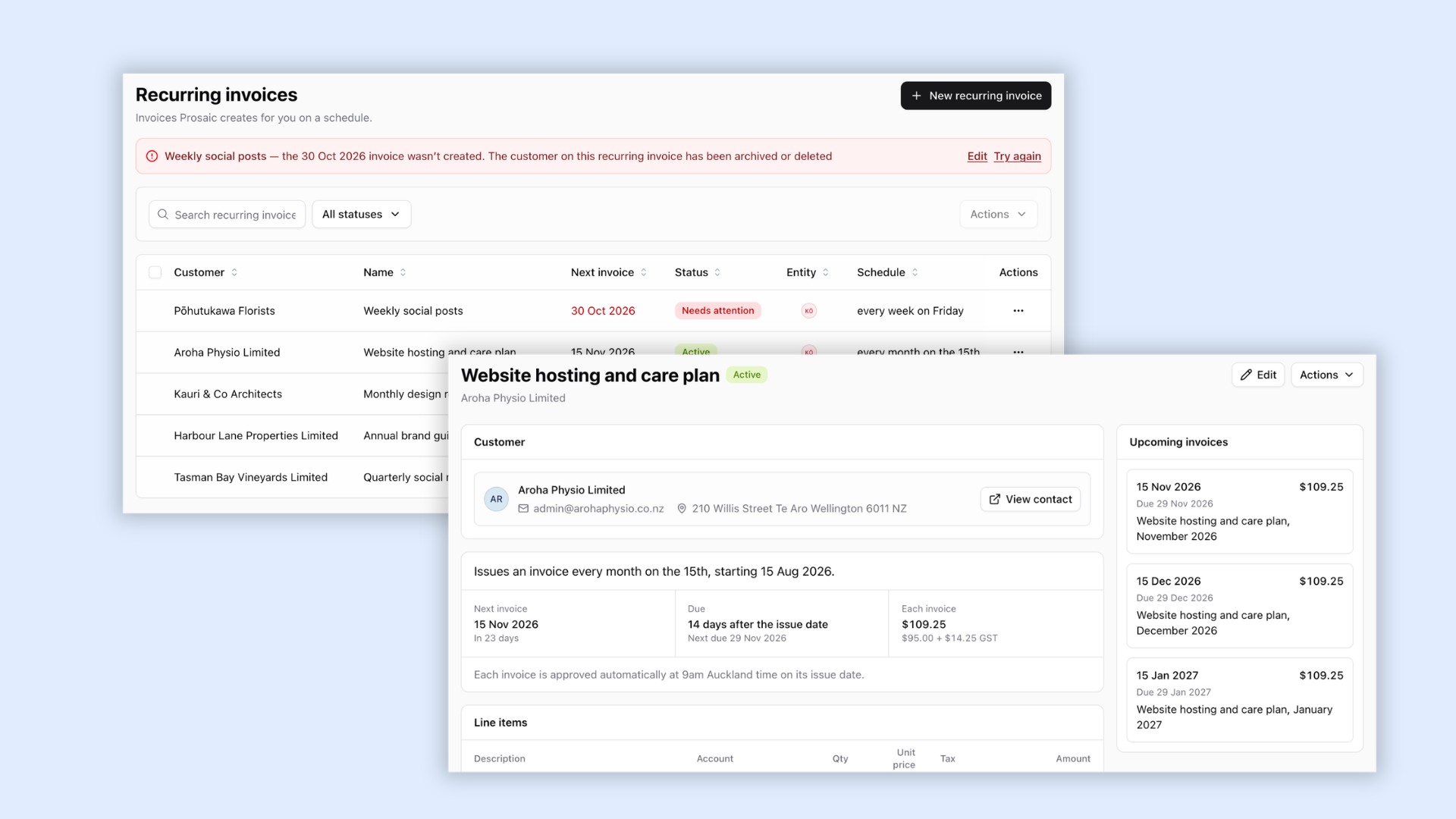
You can now set up invoices to repeat automatically on a schedule.
Create a recurring invoice from scratch, or select Make recurring from an existing invoice.
Choose whether each invoice should be:
- Saved as a draft for review.
- Automatically finalised.
- Finalised and emailed to the customer at a scheduled time.
The new Invoices → Recurring tab gives you visibility over upcoming invoices, their status and any issues requiring attention. You can also pause, resume or end recurring schedules.
Schedule and bulk-send invoices
Need to send an invoice later? You can now choose a date and time for delivery.
You can also select multiple invoices to finalise or send in one go, making it easier to manage invoicing across a larger client base.
We've also made several smaller improvements, including support for negative invoice lines for discounts and credits, quicker contact selection and simpler invoice actions.
🏗️ Fixed assets, straight from bank reconciliation
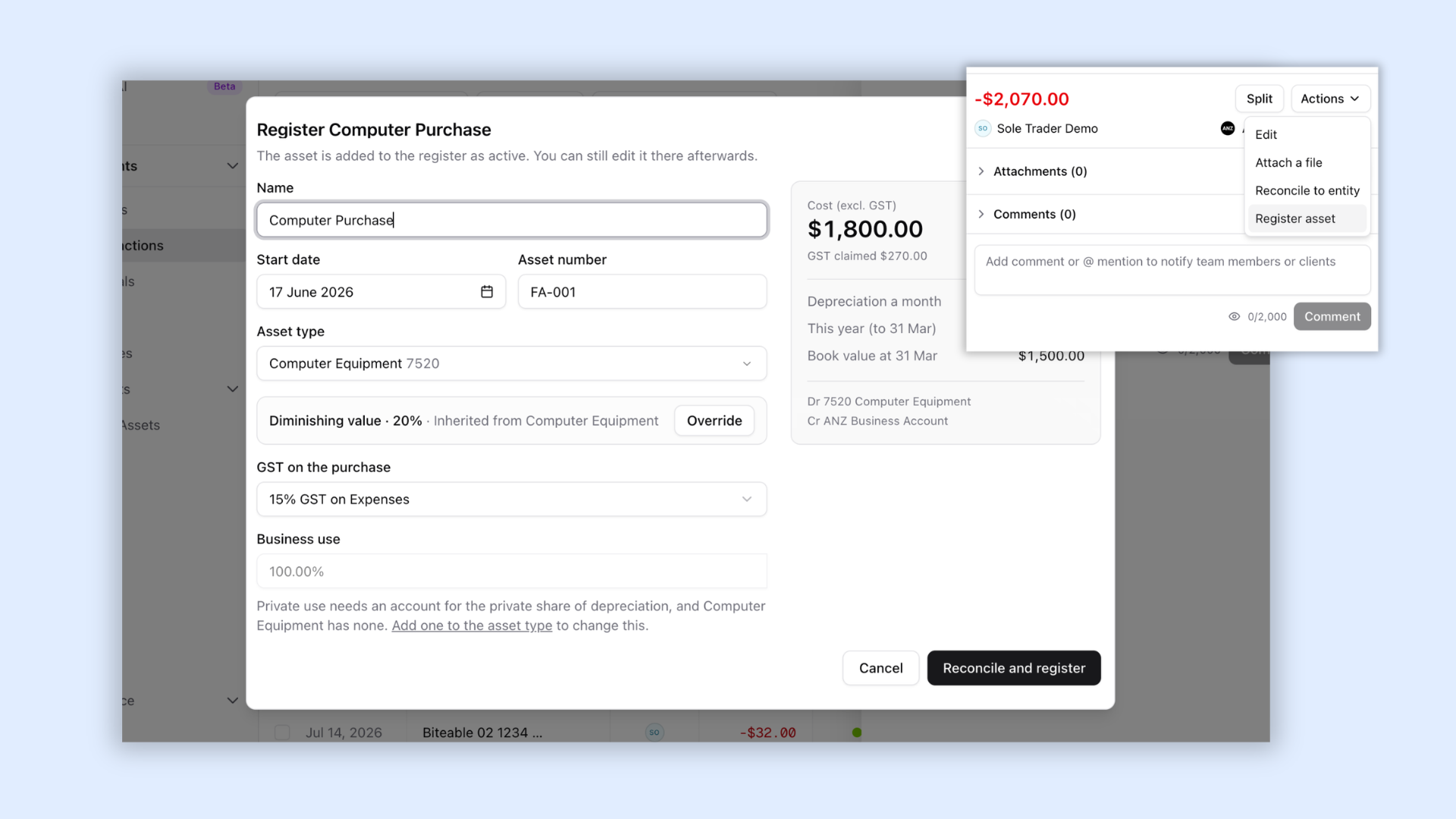
You can now register and record the sale of fixed assets directly from bank reconciliation screen, without needing to switch between tabs , or remembering to activate draft fixed assets later
Register an asset
When reconciling a purchase, select Register asset from the transaction actions.
Prosaic will help you capture the asset details, suggest depreciation settings and show a preview of the accounting treatment, including GST, depreciation and book value.
Select Reconcile and register to complete the bank reconciliation and add the asset to your register in one step.
Record an asset sale
You can also record the sale of an existing fixed asset directly from a bank deposit.
Prosaic handles the disposal and bank reconciliation together, avoiding duplicate entries. Asset sales can also be reversed if you need to correct a mistake.
Easier asset corrections
We've also improved how you manage assets after registration.
- Edit an active asset's cost, depreciation settings or business-use percentage.
- Preview changes before Prosaic reverses and reposts affected depreciation.
- See warnings when a source transaction or journal has changed.
- Automatically reverse depreciation posted after an asset's disposal date.
📚 Import historical ledger data
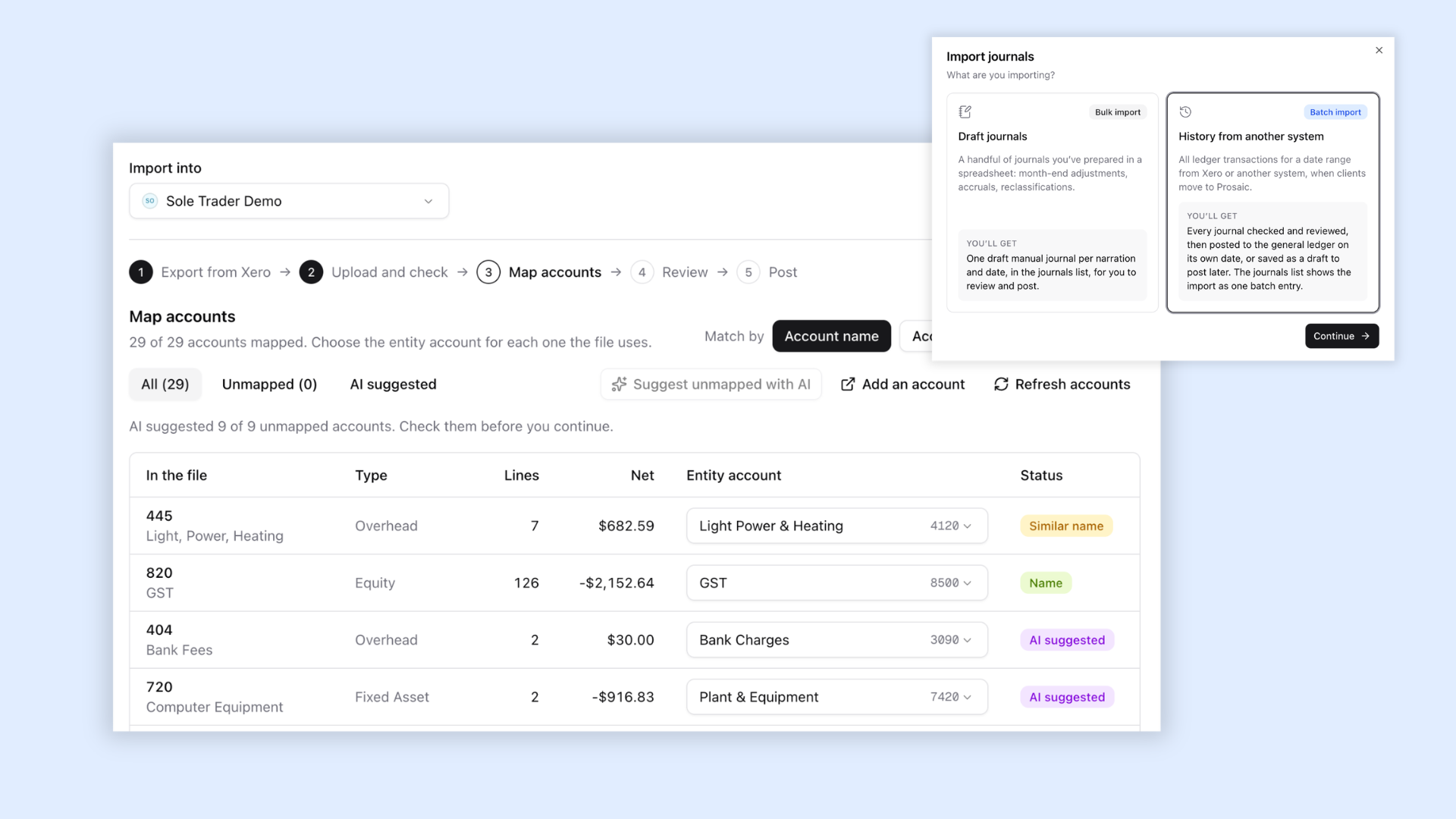
Bringing a client onto Prosaic partway through a financial year is now much easier.
You can import their historical General Ledger Detail directly into Prosaic, helping you bring across transactions from their previous accounting system.
Simply upload a General Ledger exported from Xero, or use our CSV template for other accounting systems.
Prosaic validates the import, helps you map accounts with AI, checks that journals balance and processes the historical entries together.
The entire import is represented as a single batch entry in your Journals list, making it easy to identify and review imported history separately from everyday journals.
✨ Introducing Prosaic AI — Open Beta
Since launching our MCP server, we've seen accountants use Prosaic with tools like Claude and ChatGPT to automate accounting tasks in new and exciting ways.
For firms that haven't yet embraced the advanced capabilities of these tools, or for simpler tasks that don't require an external AI assistant, we've been working on bringing a conversational AI assistant directly into Prosaic.
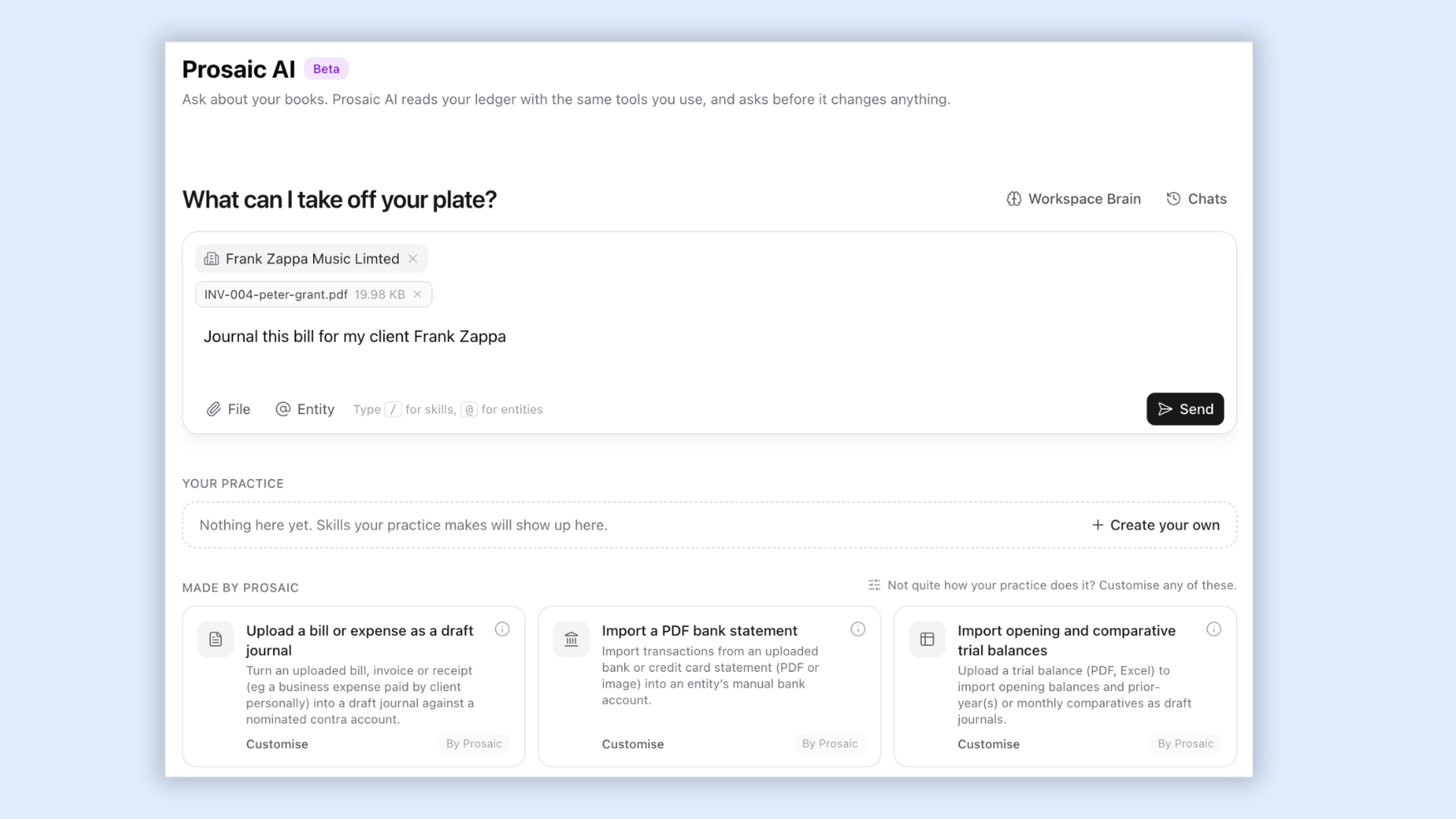
Prosaic AI is now available in Open Beta. It has access to the same tools as our MCP server, along with some additional capabilities built specifically for Prosaic, including:
- Working with uploaded files, such as importing PDF bank statements or drafting journals from documents.
- Creating and saving reusable skills for your workspace or individual clients, with instructions for how specific tasks should be completed.
- Accessing additional information not available through our public API, such as IRD account balances.
- Scheduling recurring jobs to automate regular tasks.
You can also use natural language to code transactions, review financial information and complete other everyday accounting tasks.
Prosaic AI works alongside you, requesting your approval before making changes to accounting data.
We've allocated free credits to all paid workspaces during the Open Beta, so you can give it a try. We'd love you to experiment with it and share your feedback as we continue developing its capabilities.
🛠️ Other improvements
- Reporting improvements: Display financial reports and report packs in whole dollars, including exports and emailed copies. General Ledger exports now include account codes, mapped codes and account names.
- More bank statement formats: Import OFX and QFX files, alongside existing CSV support.
- Import bank statements via API and MCP Server: Our API now supports bank statement import, use Claude or ChatGPT to convert a PDF statement and import it automatically
- Automatic transfer suggestions: When money moves between an entity's own bank accounts, Prosaic suggests coding both sides as a transfer.
- Improved audit history: See who changed a rule and when, and identify journal changes made through Prosaic AI, MCP or the API.
🔗 Akahu bank feed upgrades
Akahu is retiring its classic bank connections.
We've added a simpler upgrade process to help clients move to supported connections. Affected clients will receive an email with your firm's logo and a direct upgrade link, with reminders also displayed in their dashboard.
As always, thanks for your feedback and suggestions. They continue to shape what we build next.